Follow these steps to Zoom out or in on your browser:
Internet Explorer
- Click
 or Tools > Internet Options
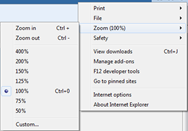
 - When the Customize window appears, the third line shows your current zoom level
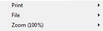
- Hover on that line to open the slideout menu. Choose from the list of options or click custom and enter your preferred zoom level (e.g., 90)
Google Chrome
- Click
 (Customize Chrome)
 - When the Customize window appears, halfway down you'll see your current zoom level between a minus and plus button
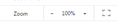
- Click minus or plus to adjust your zoom level
Mozilla Firefox
- Click
 to open menu
 - When the Menu window appears, the second line shows your current zoom level between a minus and plus button
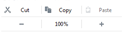
- Click minus or plus to adjust your zoom level
Comments